

一、概述
用户可以在模板管理页新建、设计打印模板。
在项目/产品线的具体页面增加打印按钮,有两种打印方式:直接打印 和 预览并打印。
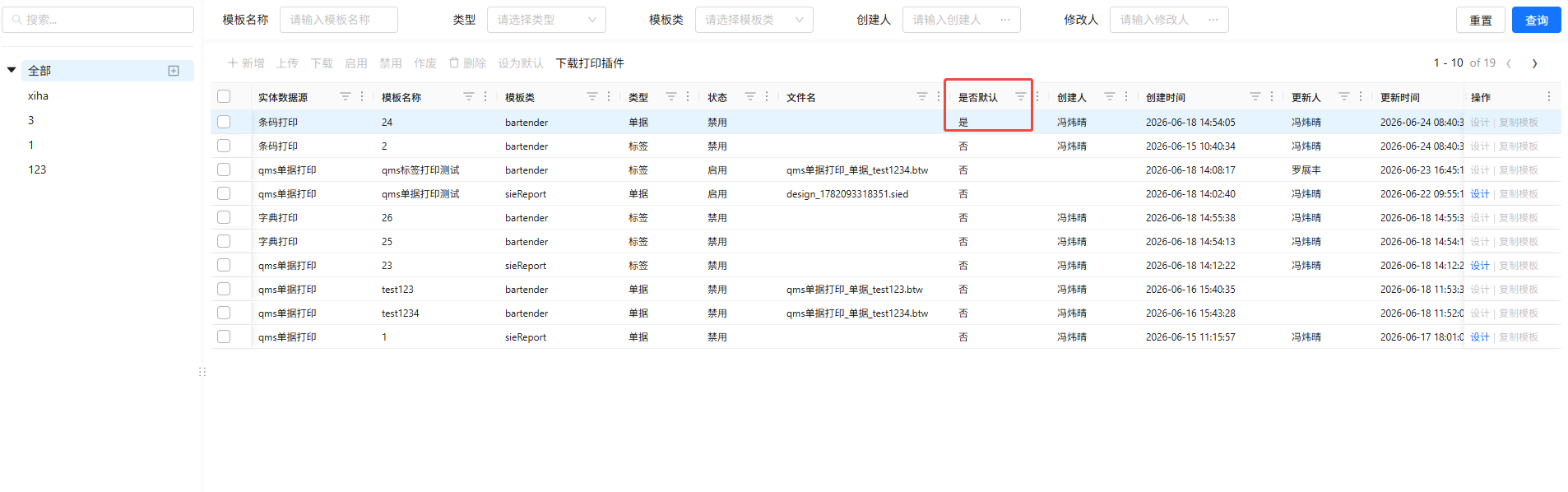
二、模板管理页:每种实体数据源只有一个默认模板
默认模板用于直接打印时,跳过选择模板的操作。因此只能有一个默认模板。
三、以 qms 的 首件检验 页为例 (因此选择打印模板的弹窗会过滤实体数据源为qms单据打印且状态为启用的打印模板)
1. 打印按钮的配置和点击回调函数
按钮组增加配置
{
	key: 'print',
	innerType: 'print',
	label: '打印',
	disabled: // 单次只能选择一行数据进行打印,
},
{
	key: 'preViewAndPrint',
	innerType: 'print',
	label: '预览并打印',
	disabled: // 单次只能选择一行数据进行打印,
}
“打印”按钮点击回调函数
const handleSlientPrint = useCallback(async () => {
    if (rowsRef.current.length === 0) return;
    //  先获取默认打印模板
    const defaultTemplate = await printApi.page({
        schemeName: 'qms单据打印',
        status: '1',
        isDefault: '1',
    });
    if (defaultTemplate.code === 0 && defaultTemplate.data?.total > 0) {
        // 然后直接打印
        handlePrint(defaultTemplate.data?.records);
    } else {
        toast.warning('未配置启用状态的默认打印模板,请通过“预览并打印”按钮进行打印');
    }
}, [toast]);
“预览并打印”按钮点击回调函数
const handlePrint = useCallback((value: PopEditorRowValue | PopEditorRowValue[] | null) => {
    // value 是弹窗里选择的模板数据
    const rows = Array.isArray(value) ? value[0] : value;
    if (!rows) return;
    //  获取当前选中行的数据
    const mainTableRows = rowsRef.current;
    if (rows?.reportName === 'bartender') {
        // 打印
        (async () => {
            try {
                toast.info('正在检测打印机...');
                const proxyHost = await fetch('http://localhost:8081/id')
                    .then(r => r.json())
                    .then(d => d.machineId)
                    .catch(() => {
                        toast.error('未启动打印插件');
                        return '';
                    });

                if (!proxyHost) return;

                const res = await printApi.printProxy({
                    path: `${window.location.origin}/sieapi/kernel/oss/file/manager/download/id?id=${rows.fileId}`,
                    code: rows.schemeCode,
                    ids: [mainTableRows[0].id], // 打印时传递的id是当前选中的行的id
                    printCount: 1,
                    proxyHost,
                });
                if (res.code === 0) {
                    toast.success('打印成功');
                }
            } catch (error: unknown) {
                toast.error('打印失败');
            }
        })();
    } else if (rows?.reportName === 'sieReport') {
        window.open(
            `${window.location.origin}/imom-app-sys/sys/#/print?templateId=${rows.id}&productType=${rows.productType}&schemeCode=${rows.schemeCode}&type=print&dataId=${mainTableRows[0].id}`,
            '_blank'
        );
    }
}, []);
2. 选择打印模板弹窗配置
配置文件路径:imom-qms-ui\apps\qms\src\pop-editor-ui\fragments\printTemplate.sample.ts
import type { PopEditorUiConfigMap } from '@/utils/popEditor';

const sample: PopEditorUiConfigMap = {
  printTemplate: {
    title: '打印模板选择',
    modalTitle: '请选择打印模板',
    textField: 'name',
    searchFormItems: [
      {
        name: 'schemeCode',
        label: '编码',
        props: { placeholder: '请输入' },
        component: 'Input',
      },
      { name: 'name', label: '名称', props: { placeholder: '请输入' }, component: 'Input' },
    ],
    columnDefs: [
      { field: 'schemeCode', headerName: '编码', width: 150 },
      { field: 'name', headerName: '名称', width: 150 },
      { field: 'schemeName', headerName: '方案名称', width: 150 },
      {
        field: 'reportName',
        headerName: '模板类',
        keyCode: 'sysSys.print.reportName',
        width: 150
      },
      {
        field: 'templateType',
        headerName: '类型',
        keyCode: 'sysSys.print.templateType',
        width: 150
      }
    ],
    request: {
      url: '/imomapi/server/sys/v1/print-template-info/page',
      type: 'api',
      method: 'post',
      params: { schemeName: 'qms单据打印', status: '1' },
    },
  },
};

export default sample;
3. 在 首件检验 页面添加选择打印模板弹窗
import {
    ButtonGroup,
    PageGenerator,
    PopEditorBiz,
    useToast,
    type ApiParams,
    type PageGeneratorProps,
    type PageGeneratorRef,
    type PopEditorRowValue,
} from 'web-designer-comps-shared';
import printApi from '@/api/modules/print';

function DemoPage() {
	const[open, setOpen] = useState(false);

	const handleOpenChange = useCallback((v: boolean) = >{
		setOpen(v);
	},
	[setOpen]);

    const handlePrint = useCallback((value: PopEditorRowValue | PopEditorRowValue[] | null) => {
        // value 是弹窗里选择的模板数据
        const rows = Array.isArray(value) ? value[0] : value;
        if (!rows) return;
        //  获取当前选中行的数据
        const mainTableRows = rowsRef.current;
        if (rows?.reportName === 'bartender') {
            // 打印
            (async () => {
                try {
                    toast.info('正在检测打印机...');
                    const proxyHost = await fetch('http://localhost:8081/id')
                        .then(r => r.json())
                        .then(d => d.machineId)
                        .catch(() => {
                            toast.error('未启动打印插件');
                            return '';
                        });

                    if (!proxyHost) return;

                    const res = await printApi.printProxy({
                        path: `${window.location.origin}/sieapi/kernel/oss/file/manager/download/id?id=${rows.fileId}`,
                        code: rows.schemeCode,
                        ids: [mainTableRows[0].id], // 打印时传递的id是当前选中的行的id
                        printCount: 1,
                        proxyHost,
                    });
                    if (res.code === 0) {
                        toast.success('打印成功');
                    }
                } catch (error: unknown) {
                    toast.error('打印失败');
                }
            })();
        } else if (rows?.reportName === 'sieReport') {
            window.open(
                `${window.location.origin}/imom-app-sys/sys/#/print?templateId=${rows.id}&productType=${rows.productType}&schemeCode=${rows.schemeCode}&type=print&dataId=${mainTableRows[0].id}`,
                '_blank'
            );
        }
    }, []);

    return (
        <div
            style={{
                flex: 1,
                minHeight: 0,
                width: '100%',
                display: 'flex',
                flexDirection: 'column',
                overflow: 'hidden',
            }}
        >
            <PopEditorBiz
                bizType="printTemplate"
                open={open}
                onOpenChange={handleOpenChange}
                onChange={handlePrint}
                inputProps={{ style: { display: 'none' } }}
            ></PopEditorBiz>
        </div>
    );
}
4. 打印相关api
api文件路径:imom-qms-ui\apps\qms\src\api\modules\print.ts
/**
 * 模板管理模块 - 接口配置
 */
import request from '@/api/index'; // 引入请求模块

const baseURL = '/imomapi/server';

const basePath = '/sys/v1/print-template-info';

const templateApi = {
    page: (data: any) => {
        return request({
            baseURL,
            url: `${basePath}/page`,
            method: 'post',
            data,
        });
    },

    /**
     * 打印标签
     * @param {object} params PrintBartenderProxyDTO
     * @param {string} params.path 标签模板路径
     * @param {string} params.code 编码
     * @param {array} params.ids 单据ID列表
     * @param {number} params.printCount 打印份数
     * @returns
     */
    printProxy(data: any) {
        return request({
            baseURL,
            url: `/sys/v1/print/proxy`,
            method: 'post',
            data,
        });
    },
};

export default templateApi;